

What Software and Controller Can Be Used For CNC Router Machines?
Type3
Type3 is an all-round CNC router software solution to the graphic design requirements of woodworking. It runs under Microsoft Windows system, has the best graphic design software package, and is closely integrated with the processing process. From simple characters to complex pattern making, Type3 has powerful functions and flexibility to solve all professional engraving problems. Type3 fits all your habits, easy to learn and use. It is an all-round software for creativity and engraving processing. Type3 can accurately calculate the three-dimensional tool path, optimize the machine processing path, and finally generate the CNC routing path, and finally generate the CNC routing code. You can freely select various tools and drills such as cone type, spherical type, and cylindrical type for routing.
Ucancam
Ucancam is a special software that integrates computer aided design (CAD) and aided manufacturing (CAM). It is widely used in advertising, signs, gifts, decoration, art, wood processing, molds and other fields.
Ucancam series software has powerful graphics design and editing functions: it supports coordinate input and can draw graphics accurately; and provides functions such as batch copy, artistic transformation, dynamic cropping, and node editing to facilitate graphics editing and modification. Automatic nesting and interactive nesting can increase the utilization rate of materials and quickly typeset.
Accurate three-dimensional tool path calculation, fast and accurate. Ucancam post-machining program is convenient to set the code requirements of different machines. It can reduce the damage of the tool and the material, and avoid leaving knife marks on the cutting surface. Cycloid machining provides strong technical support for cutting hard stone, glass and brittle materials. At the same time, a variety of machining methods such as three-dimensional, centerline, drilling, inlay, edge and corner, intelligent, round carving, image carving and image relief are available for different needs of customers; processing simulation, simulation functions, convenient and quick display of machining results, reducing machining trial process, reduce machining costs.
ArtCAM
The ArtCAM software product series is a unique CAD modeling and CNC and CAM processing solution produced by the British company Delcam. It is the preferred CAD/CAM software solution for complex three-dimensional relief design, jewelry design and processing. It can quickly convert two-dimensional ideas into Three-dimensional art products. The all-Chinese user interface enables users to design and process 3D relief more conveniently, quickly and flexibly. It is widely used in the fields of engraving production, mold manufacturing, jewelry production, packaging design, medal and coin manufacturing, and sign making.
Delcam ArtCAM software series can convert all plane data such as hand-drawn drafts, scanned files, photos, grayscale maps, CAD and other files into vivid and exquisite three-dimensional relief digital models, and generate codes that can drive the operation of CNC machine tools. ArtCAM includes a wealth of modules, these modules are fully functional, fast running, reliable performance, and extremely creative. Using the relief model generated by Delcam ArtCAM, a more complex relief model can be generated through Boolean operations such as union, intersection, difference, and arbitrary combination, superposition, and splicing. And you can render and process the designed relief. Users do not need to spend time and money to create real models. Through the screen, designers can intuitively see the real design results.
Alphcam
Aphacam comes from Lycome of Coventry, UK. It is a powerful CAM software. The software has powerful contour milling and an unlimited number of pocket machining tools. The pocket machining tools can automatically clean the remaining materials and customize the settings. Tool path and speed act on all windows at the same time for physical dynamic simulation.
Aphacam automatic nesting software is currently the mainstream software in the cabinet door processing industry. Its advantage is that a door type only needs to establish a processing model (tool path) once, and it can realize automatic nesting of any size without re-drawing. Compared with traditional software, the efficiency is significantly improved.
Cabinet Vision (CV)
Cabinet Vision is a 3D integrated cabinet custom design software under Windows system. It can easily realize accurate auxiliary design, and conduct professional graphic design in strict accordance with corporate design specifications. Dedicated to cabinets and wardrobes, easy to operate and powerful. Cabinet Vision can accurately assist in the establishment of walls, select and design corporate standard system product graphics, synchronously generate floor plans, elevations, side views, three-dimensional renderings and assembly exploded views, automatically generate multiple rendering views, and fully match the customer's ownership Visual requirements, automatic generation of retail quotations and parts lists, automatic splitting, design and splitting only takes 30 minutes, zero errors, strict compliance with industry standards, complete accurate cabinet design, store design can be generated in real time in the store according to customer customized requirements A variety of renderings and retail lists, and then connect with the post-processing end of the factory to place orders remotely, and guide the factory to generate and process.
What Controller Can Be Used For CNC Router Machines?
Mach3 CNC Controller
Mach3 is an economical and powerful machine tool control system when running on a computer. It is the most popular CNC contorller in the world. The operation of Mach3 requires a computer with at least a 1GHz processor and a 1024×768 pixel display. In this configuration, the Windows system can run fully. Desktop computers will be more applicable and economical than notebook computers. When the computer is not used to control the machine tool, it can also be used to meet other functions of the workshop. Mach3 mainly transmits signals through the parallel port, and it can also be transmitted through the serial port. The drive motors of each axis of the machine tool must be able to receive step pulse signals and direct signals. All stepper motors, DC servo motors and AC servo motors with digital encoders meet this requirement. If you want to control an old CNC machine tool whose servo system uses a resolver to measure the position of the tool, then you must replace each axis with a new drive motor.
Ncstudio CNC Controller
Ncstudio CNC controller is the mostly used CNC control system from China. The system can directly support G code, PLT code format and fine routing generated by MASTERCAM, UG, ArtCAM, CASMATE, AUTOCAD, CorelDraw and other CAM/CAD software. In addition to the functions of manual, stepping, automatic and machine origin return, Ncstudio also has unique functions such as simulation, dynamic display tracking, Z-axis automatic tool setting, breakpoint memory (program skip execution) and rotary axis processing. The system can be used with various 3D CNC mills and routers. It is suitable for all kinds of complex mold processing, advertising decoration, cutting and other industries.
Syntec CNC Controller
Syntec is a popular CNC control system developed by Taiwan Syntec Technology Co., Ltd. Taiwan Syntec is currently the most promising professional PC-based controller brand. Specializing in the R&D, manufacturing, sales and service of PC-based controllers. The machine is equipped with Syntec system, stable performance, convenient and flexible operation, supports dual-program, three-program and four-program display, machine coordinates, program editing and processing monitoring are presented separately, each axis group coordinates are displayed independently, and each axis group can be simulated simultaneously . Rotate the program coordinates, you can simply write the processing program, perform three-dimensional processing on the inclined surface, and easily realize milling, drilling and tapping. Supports Yaskawa bus communication control mode, which greatly reduces wiring costs and space requirements, and improves cost performance. Equipped with the Yaskawa bus communication control method, it improves the wiring and expandability problems of the traditional pulse-type general-purpose controller, so that the system is more simplified, more expandable, and easier to assemble.
DSP Controller
DSP controller is a handle control system. The DSP controller can run offline. It can be completely separated from the computer during the engraving process and can directly control the engraving machine. Handle operation, humanized design, large screen display, multi-language interface, easier operation and more convenient maintenance. The algorithm is advanced, and the unique intelligent prediction algorithm is adopted to give full play to the potential of the motor, realize high-speed continuous processing, synchronize the curve and straight line, and make the curve smoother. Super error correction, with the ability to pre-check processing documents, prevent writing or design errors in processing documents, and prevent material placement beyond the processing range.
NK CNC Controller
NK series control system is an economical all-in-one machine with high reliability and high cost performance; imported micro switches, panel function keys can be configured, and timing ports can be customized, providing parameter import and export and simple and quick system backup functions. The terminal board on the back of the all-in-one machine provides the 24V power input port, USB port, handwheel port, brake input port, brake output port, analog output port, servo drive interface (X-axis, Y-axis, Z-axis) required by the system, 16 general-purpose input ports and 8 general-purpose relay output interfaces. The operation panel provides emergency stop button, power button and spindle override and feedrate override band switches.
What You Should Know Before Buying?
What to look for when ordering yours?
Before investing, you need to visit an existing user and get a firsthand account of the machine from someone who has actually lived through using it. Try to visit on your own, without a salesman around. You'll hear pretty quickly how effective it has been for them.
If you can't find a shop running the machine that you want to look at, another way to gain insight about the machine is by receiving a demonstration either in-person or online-using something like Whatsapp. This is the best way to understand how the machine works, and you can see it complete a job from start to finish.
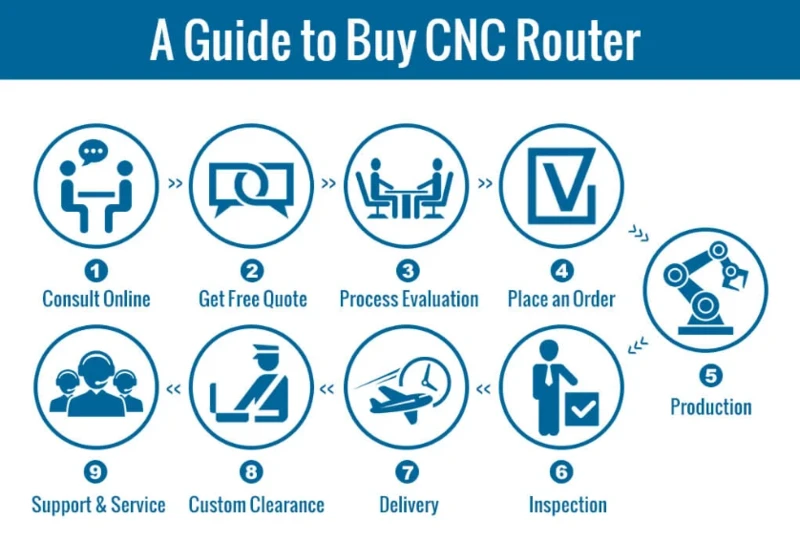
How To Buy A CNC Router Machine?
1. Consult: we will recommend the right machine to you after being informed by your requirements, such as the material you want to carve, the max size of the material (Length x Width x Thickness).
2. Quotation: We will send you free quote according to your required machine with affordable price.
3. Process Evaluation: Both sides carefully evaluate and discuss all the details of the order to exclude any misunderstanding.
4. Placing Order: If there is no doubt, we will send you the PI (Proforma Invoice), and then we will sign a contract with you.
5. Production: We will arrange the production as soon as receiving your signed sales contract and deposit. The latest news about production will be updated and informed to the buyer during the production.
6. Inspection: The whole production procedure will be under regular inspection and strict quality control. The complete machine will be tested to make sure they can work very well before out of factory.
7. Delivery: We will arrange the delivery as the terms in the contract after the confirmation by the buyer.
8. Custom Clearance: We will supply and deliver all the necessary shipping documents to the buyer and ensure a smooth customs clearance.
9. Support and Service: We will offer professional technical support and intime service by Phone, Email, Skype, WhatsApp around the clock.
FAQs
How to Setup, Install and Debug a CNC Router Machine?
Step 1. Setup the machine frame.
1.1. Open the packing box and check whether the appearance of the machine is intact;
1.2. Count the physical objects according to the packing list;
1.3. Place the machine with the four feet below on the base steadily;
1.4. Adjust the four feet to make them land on the ground smoothly and evenly, and make the work surface level;
1.5. Remove part of the outer cover, use clean silk cloth and kerosene (or gasoline) to clean the anti-rust oil on the lead screw and guide rail without leaving any lubricating oil and dirt;
1.6. Add lubricating oil to the motion mechanism such as the lead screw and the guide rail respectively;
1.7. Setup the outer cover, and be careful not to wear and collide with the moving parts;
1.8. Ground the machine frame well.
Step 2. Install accessories.
2.1. Install the cooling water tank of the spindle motor, connect the cooling water tank with the cooling pipe of the spindle motor, 2 cooling water in the water tank, the cooling water should be soft water;
2.2. Install the workpiece cooling system, connect the coolant tank to the water outlet of the bed diversion groove with a water pipe, and connect the upper water pipe. Add applicable workpiece coolant to the workpiece cooling box;
2.3. Install the tool setting instrument, connect and lock the signal line of the tool setting instrument with the interface of the machine tool setting instrument.
Step 3. Setup the electrical control cabinet.
3.1. Ground the electrical control cabinet well;
3.2. Connect and lock each input interface of the machine tool with the corresponding output interface of the electrical control cabinet with a control cable;
3.3. Connect the computer input control interface of the electrical control cabinet to the control computer with a control cable, and lock it with screws;
3.4. Connect and lock the interface between the operation keyboard and the electrical control cabinet with a control cable;
3.5. Turn off the power switch of the electrical control cabinet, and connect the power socket of the electrical control cabinet to a 220V, 50HZ power supply.
Step 4. Install CNC control system and software.
4.1. Turn on the control computer;
4.2. Install the attached machine control system.
Step 5. Equipment debugging and trial operation.
5.1. After checking that all signal cables are connected correctly, and the required grounding is good, turn on the power switch of the electrical control cabinet and warm up for 10 minutes;
5.2. Operate the operating keyboard to check whether the state of the machine tool and the movement characteristics are normal;
5.3. After the machine tool status and movement characteristics are checked correctly, run the idling test and add lubricating oil to the movement mechanism.
How to Use A CNC Router Machine?
1. Design and typesetting according to requirements. After calculating the path correctly, save the generated tool path as a different file.
2. After checking that the path is correct, open the path file in the CNC control system (preview available).
3. Fix the material and define the origin of the work. Turn on the spindle motor and adjust the parameters correctly.
4. Turn on the power and operate the machine.
Turn on the power switch, the power indicator light is on, the machine first performs reset and self-check operation, X, Y, Z, axis return to the zero point, and then each run to the initial standby position (the initial origin of the machine). Use the controller to adjust the X, Y, and Z axes respectively to align with the starting point (processing origin) of the routing work. Properly select the rotation speed of the spindle and the feed speed to make the machine in a working waiting state. Transfer the edited file to the machine to automatically complete the routing work of the design.
How to Maintain A CNC Router Machine?
1. Clean the dust in the electrical box regularly (according to the usage), check whether the wiring terminals and the screws of each component are loose, to ensure the safe and reliable use of the circuit.
2. After the machine is used every time or tomorrow, be sure to clean up the dust and debris on the platform and transmission system (if it is not cleaned, a lot of dust and impurities will enter the screw, guide rail and bearing under long-term operation. It's just that the rotation resistance of the lead screw and the bearing is large, which leads to the phenomenon of step and dislocation when the engraving speed is slightly faster), and the transmission system (X, Y, Z axis) is lubricated and oiled regularly (weekly).
3. It is recommended that the continuous running time of the machine be controlled below 10 hours per day.
4. The water pump and the spindle are mutually interrelated. It is necessary to check to replace the circulating water for the machine, to keep the water clean to prevent the water outlet of the pump from being blocked, and to prevent the water-cooled spindle from running at high temperatures and causing component damage; to ensure the normal operation of the water pump, Never make the water-cooled spindle appear water shortage.
5. If the machine is not used for a long time, it should be lubricated regularly (weekly) and then run empty to ensure the flexibility of the transmission system.
Things To Consider
When you receive the CNC router, you should unpack and inspect the machine. After turning on the power, carefully check whether there is any damage to the appearance and whether it has been damaged by impact during transportation. If it is in good condition, please check the machine configuration of the accompanying accessories according to the contract with the accompanying instructions. The machine is installed by a technician (including hardware installation, removal of fixed parts, machine installation, various cables to the power supply, software installation, computer configuration and installation of the optional software). After the installation is completed, use the test drawing files provided by the manufacturer to test the machine. If the test is completed correctly, the delivery and acceptance of the test is complete. CNC operators require proficient computer skills. During the training, they should become proficient in selecting different speeds for different materials and using different router bits. This typically requires the accumulation of experience, and good mastery is of great benefit to extending the service life of machines and tools.