

2025 Best CAD/CAM Software for CNC Machines (Free & Paid)
CNC programmers who are working with CNC machining, mechanical designing or manufacturing should be aware of the world-renowned CAD/CAM software. But newbies and beginners who are new to CNC machine have no idea on how to start with CAD/CAM software. Then this article will help and guide you to review the 21 best paid and free CAD/CAM software based on Windows, macOS, Linux for popular CNC machines in 2025.
What is CAD/CAM software?
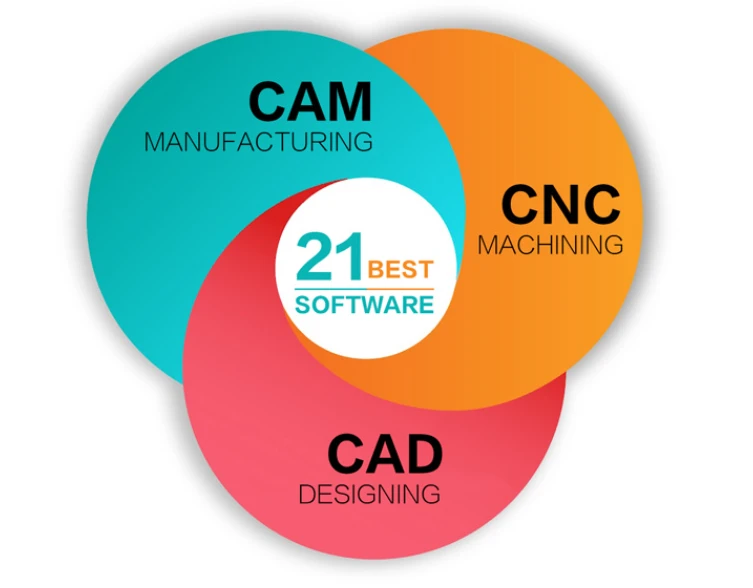
CAD/CAM software is a computer-aided design and manufacturing program for CNC machines, which helps users to do automatic CNC machining in industrial manufacturing. CAD makes designs more manageable and accessible, while CAM redefines how manufacturing works. CAM uses digital codes to quickly convert CAD-generated models into physical products. This reduces the traditional operational lag between the design and CNC machining.
CAD (Computer Aided Design) software helps designers or drafters create computer models based on specific geometric parameters. During the design phase, a 3D model representation is displayed on the monitor, which can then be customized by changing the relevant parameters of any particular part of the model.
This enables designers to view the model from multiple angles and test it virtually to simulate real-life situations. This really changes the way designers perform their duties and opens up new avenues for innovation.
CAM (Computer Aided Manufacturing) takes over where CAD left off. With CAM, drafters can use relevant geometric design data to manage automated machinery.
CAM (Computer Aided Manufacturing) software is unique in that it is associated with a CNC (Computer Numerical Control) system rather than an older Numerical Control (NC) system. This makes it easier for designers to mechanically encode geometric data into the system.
What is CAD/CAM software used for?
CNC designers use CAD for modeling, while CNC machinists use CAM software for industrial manufacturing.
CAM/CAM software is used for CNC router, CNC lathe machine, CNC milling machine, CNC plasma cutter, CNC laser cutting machine, laser engraving machine, laser welding machine, CNC digital cutter, CNC water-jet cutter, CNC grinding machine, CNC boring machine, CNC bending machine, CNC winding machine, CNC spinning machine, CNC punching machine, CNC drilling machine, CNC machining center, and other CNC machines.
CAD and CAM are two computer-based programs, which are integrated to seamlessly simplify the design and manufacturing phases with encoded geometric data. Due to the linkage of CAD and CAM, the time span required for the design and manufacturing process is greatly shortened.
In addition, the scope of automated production has been expanded due to the introduction of highly economical alternatives to CAD/CAM.
Considering the ability to integrate these two technologies, an organization's overall spending has been slashed. In addition, the user-friendliness of the CAD/CAM software system makes the design and manufacturing process faster.
In short, CAD/CAM software puts more control in the hands of the designer, which further simplifies the end-to-end design and manufacturing process.
Why use CAD/CAM Software in CNC machining?
CAD/CAM software will make CNC machining smart and easy-to-use. You can get many benefits by using CAD/CAM software in CNC machining.
Save time
With CAD/CAM software systems, you can save time at every stage of the design and engineering process. That's because CAD/CAM software programs help you design and produce prototypes and finished products in a fraction of the time.
Greater Control and Accuracy
CAD/CAM systems give designers and engineers greater control over their creative and production processes. Designers can zoom in and inspect each part of the model to spot any errors and correct them in real-time, improving accuracy and reducing operating expenses.
Integration
CAD/CAM software helps engineers and designers integrate their operations with each other. This means that people can design a 3D model on their CAD software and then connect it directly with the production plant to generate a real prototype of the new design model.
Seamless and error-free design process
Before the debut of CAD/CAM software, designers had to manually draw every part of a model on paper using pencils, compasses, and other tools. This makes the process difficult, hectic, time-consuming and error-prone. With CAD CAM software solutions, there is no such hassle. You can take advantage of the program's built-in tools to check for defects in your models and automate the redesign process.
Reduced waste
Thanks to the simulation capabilities of CAD-CAM software programs. Manufacturers can visually inspect the entire machining process before actually building a prototype. This enables manufacturers to identify design flaws at an early stage, reducing raw material waste.
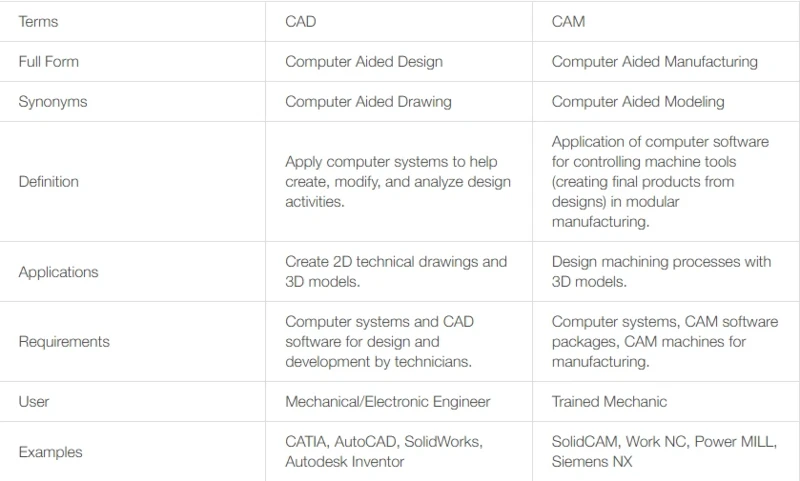
What is the difference between CAD and CAM?
What CAD/CAM software should I use?
It depends a lot on your design requirements and also on the CAD software you already use. There will be some differences between the CAM solutions in the market. There are three basic types of CAD/CAM software we mentioned today:
• CAM tools packaged with CAD suites.
• Standalone CAM program.
• CAM plug-in for CAD programs.
• CAD/CAM software.
The advantage of the CAM capabilities built into many CAD software is that they are associative. This important feature refers to the link between the original CAD design and the tool paths created by the CAM module. It's both real-time and money-saving.
Since the tool path is linked back to the CAD design, all changes are immediately reflected on the tool path. This means that you don't need to manually re-import CAD files into external CAM software and then reprogram tool paths from scratch.
Generally speaking, the CAM operations built into CAD programs are very basic. This makes them not powerful enough to create tool paths for highly complex parts with many features.
What is dedicated CAD/CAM software?
Dedicated CAD/CAM software enables powerful CAD and CAM operations that allow the creation of complex geometries like turbines. One thing to note, however, is that the associativity is lost when the native file of the CAD software cannot be imported. Therefore, the most important thing is that your CAM software and CAD program need to support the same file format. In many cases "intermediate" formats (industry standards like iges, step, stl) will do the trick.
In the worst case, every change in the design requires you to go back to the drawing board, or in other words, go back to the native CAD software, and start the process of creating the tool paths in the CAM software all over again.
What is CAD/CAM plug-in?
A middle ground with great advantages between the above two solutions - CAD/CAM software plug-ins. CAD/CAM plug-ins are provided to many software developers to provide comprehensive CAM functionality to native CAD software. In this way, the associativity is preserved and the user benefits from the dedicated CAM software.