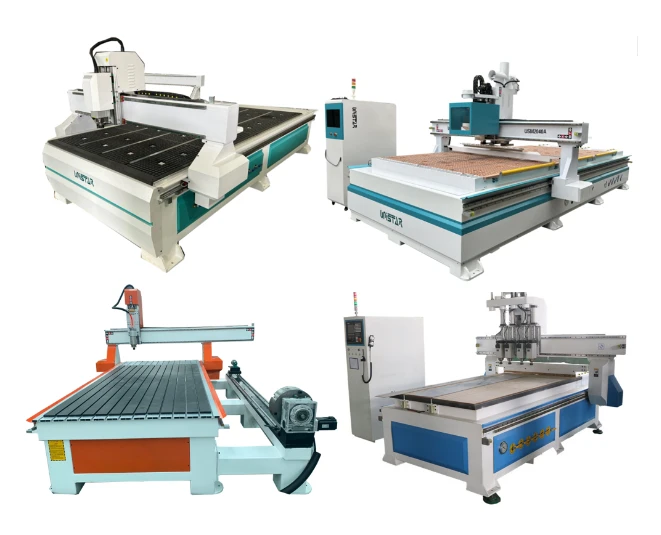
How To Use 4x8 CNC Router 1325?
UNISTAR has summarized the basic operation method for your reference.
1. Typesetting according to customer's design requirements. After calculating the path, save the paths of different tools and save them as different files.
2. After checking that the path is correct, open the path file in the control system (preview is available).
3. Fix the material and define the origin of the work. Turn on the spindle motor and adjust the number of revolutions correctly.
4. Turn on the power to operate the machine.
Starting
1. Turn on the power switch, the power indicator light is on, the machine first performs reset self-check operation, X, Y, Z, axes return to the zero point, and then each run to the initial standby position (the initial origin of the machine).
2. Use the controller to adjust the X, Y, and Z axes respectively, and align the starting point (working origin) of the work. The rotation speed of the spindle and the feed speed are appropriately selected to make the machine in a working waiting state.
Working
1. Edit the file.
2. Open and transfer the file to the machine, and the working can be automatically completed.
Ending
When the work is finished, the machine will automatically lift the bit and run to the top of the starting point.
FAQs
What Is A 4 Axis CNC Machine Used For?
4 axis CNC machine can do all 3 axis CNC machine can do. The 4 axis spindle (B axis) can rotate ±90 degree, which is suitable for side milling, drilling, cutting, lock slot and so on. It is especially designed for processing on different 3D curved surface carving.
How To Buy An Affordable 4 Axis CNC Machine?
1. Consult:
We will recommend the most suitable 1325 CNC machines to you after being informed by your requirements.
2. Quotation:
We will offer you with our detail quotation according to the consulted 4x8 CNC machine. You will get the most suitable specifications, the best accessories and the affordable price.
3. Process Evaluation:
Both sides carefully evaluate and discuss all the details (specifications, technical parameters and business terms) of the order to exclude any misunderstanding.
4. Placing an order:
If you have no doubts, we will send the PI (Proforma Invoice) to you, and then we will sign a contract with you.
5. Production:
We will arrange the 48x96 CNC machine production as soon as receiving your signed sales contract and deposit. The latest news about production will be updated and informed to the buyer during the production.
6. Quality Control:
The whole production procedure will be under regular inspection and strict quality control. The complete machine will be tested to make sure they can work very well before out of factory.
7. Delivery:
We will arrange the delivery as the terms in the contract after the confirmation by the buyer.
8. Custom Clearance:
We will supply and deliver all the necessary shipping documents to the buyer and ensure a smooth customs clearance.
9. Support and Service:
We will offer professional technical support and free service by Phone, Email, Skype, WhatsApp, Online Live Chat, Remote Service. We also have door-to-door service in some areas.
Care and Maintenance
1. The machine cannot be placed in a dark and humid place, nor can it be exposed to strong light, and a well-ventilated place should be selected.
2. The machine must be regularly maintained, just like the regular maintenance of a car, the screw rod should be cleaned, and lubricating oil should be dripped on the track and rotating parts to ensure the normal operation, improve the work efficiency, and reduce unnecessary losses.
3. Check the control box and wiring for looseness and wrong wiring every day before work. Long-term operation depends on whether the wire sheath is damaged and causes leakage.
4. Do not use one side of the machine frequently, which will cause the lead screw and guide rail to not contact the beam for a long time and can not be lubricated reasonably.
5. The machine has a lot of dust when working. You need to clean the gaps and dead ends of the machine every week at least.
6. Do not place sundries, corrosive or magnetic substances that can interfere with the work of the machine on the table.
Precautions
1. Configure a voltage stabilizer, because the power consumption of the engraving machine is generally relatively large, ensure that the ground wire is grounded.
2. The computer connected to the machine and the computer for network should be used separately, and regular CD-ROM software should be used to prevent viruses from attacking the computer and the machine and affecting the normal work.
3. The continuous running time of the machine is less than 10 hours a day. When you used a water-cooled method, it is necessary to keep the cooling water clean and the water pump working normally. The water spindle motor must not be short of water. The cooling water should be replaced regularly to prevent the water temperature from being too high. In winter, if the working environment temperature is too low, the water in the water tank can be replaced with antifreeze.
Troubleshooting
When using the machine to work, how to avoid errors is a concern of many customers, because errors are prone to occur due to incorrect path settings or operating errors, resulting in wasted materials. The following are some common problems and solutions summarized by UNISTAR.
1. The computer and the machine cannot find the U disk, and the data cannot be transferred.
1.1. Check whether the USB data cable is connected well, and whether the machine is in the online state.
1.2. Confirm whether the format of the U disk is FAT format, and whether the registration on the machine is completed. Whether the operation is correct.
1.3. Failure of the machine control system.
2. It runs normally during work, but there is a phenomenon of random cutting. (Do not work according to the designed drawing).
2.1. Check whether the parameters of the graphic design software, the designed drawings are correct, and whether the path parameters are set correctly.
2.2. The quality of the application software, whether the design software used matches the machine.
2.3. Strong electricity and signal interference. Check whether there is strong current and magnetic field interference around. Check whether the machine is well grounded.
3. The phenomenon of out-of-step occurs when working or calling the stored origin.
3.1. Check whether the workpiece is loose. Whether the operation is correct.
3.2. Whether the speed is too fast when calling the origin. (The speed is reasonably adjusted according to the performance of the machine)
3.3. Check whether the transmission parts of each axis are loose.
3.4. Failure of the machine control system.
4. The motor makes abnormal noise.
Check whether the motor is overloaded, there may be an internal fault in the motor, and it should be repaired or replaced in time.
5. The motor reverse direction.
Directly check whether the motor line is out of phase or change the output UVW end (ie the connection line between the inverter and the spindle motor).
6. The spindle motor is hot.
First check whether the pump is working, and then check whether the circulating water is lower than the liquid level.
7. The motor is weak or unable to rotate.
Check the circuit, check whether the motor line is out of phase, and whether the cable is short-circuited.
8. The spindle is reversed.
During the working process, the spindle reverses due to the connection between the inverter and the spindle, so just replace the connection wire.
When the spindle is reversed, if the project is engraved, the tool will be broken, and the tool may be broken during installation and use. Even if it is not broken, it will be burned red. Therefore, when this abnormal phenomenon occurs, the operator should immediately stop and check the spindle.
9. There is the phenomenon of working dislocation and direction opposite.
After power on, if there is irregular action when clicking continuously and rapidly, it is a "phase loss" fault. Check the circuit between the driver output and the stepper motor, find out the open circuit, and reconnect the fault to solve.
10. When the spindle is controlled manually or automatically, the machine does not respond.
10.1. Check whether the data cable is firmly connected, if it is loose, connect it correctly.
10.2. Check whether the drive circuit interface is loose or disconnected, and reconnect it.
10.3. Check whether the mains power circuit is powered off.