Care & Maintenance
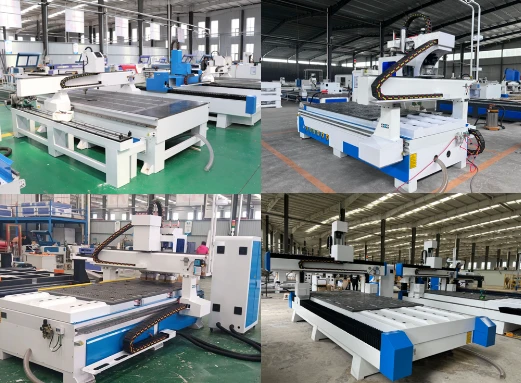
Whether you are a novice or a professional, you should do regular care and maintenance for 48"x96" CNC wood router kit and its accessories.
• The control cabinet should be placed in a well-ventilated place and cannot be placed in a high-temperature environment. Prevent the electrical components in the control box from malfunctioning due to high temperature.
• The machine should be placed in a dry and well-ventilated place (to prevent parts and accessories from malfunctioning due to exposure to the fuselage).
• The machine must be equipped with a reliable voltage stabilizer to ensure the safe grounding of the ground wire. At this point, the manufacturer has basically installed and debugged the customer in advance when configuring the control cabinet. It is best to consult before purchasing the machine.
• Try not to use the internet computer to transfer files to the machine. Computers connected to the network are likely to cause abnormalities in the machine through file transfer.
• The machine needs to be maintained every other month (add a proper amount of special lubricating oil to the screw rod and the guide rail rack). Now many manufacturers are equipped with manual or electric lubricators, which can realize faster feeding of the slider and the wire. The bar is filled with oil and does not need to be disassembled, making maintenance easier and faster.
• Maintain a good lubrication state, regularly check and clean the lead screw, add or replace lubricating grease and oil, so that the lead screw, nut and other moving parts always maintain a good lubrication condition to reduce the wear speed of mechanical parts.
• Do not allow the machine to work on the same part of the table for a long time (in case that the screw, guide rail and other transmission devices are not in contact with the beam for a long time and cannot be reasonably lubricated).
• Check whether the wiring and screws of the machine are loose within a certain period of time. It is best to tighten the screws regularly. This can also improve the accuracy of routing.
• Do not place debris (magnetic materials, corrosive items, overweight items, liquids) on the table or machine head.
Troubleshooting
The 4'x8' CNC wood router machine will inevitably have some problems during the day-to-day work. Some of the reasons are due to the configuration of the machine itself, and some of the reasons are caused by the misoperation of the user. Below we have listed some common problems and solutions for reference:
1. When setting the origin, the reason is sometimes shifted forward or shifted to the right and the shift distance is uncertain:
1.1. The limit switch is out of order. The limit switch has been closed and then bounced when the system returns to the system origin. Just change the limit switch.
1.2. The drive line is loose. Try to fix it tightly.
2. When the machine starts to reset, it makes an abnormal sound or always tops the limit switch:
2.1. The limit switch cannot be touched, just correct it.
2.2. The contact of the drive line is not good, just fix the drive line.
2.3. The limit switch wire is not connected properly, just connect the wire properly.
2.4. The limit switch is damaged, just replace it.
3. The reason why the machine cannot engrave at the origin:
3.1. Whether the layout size of the file matches the machine.
3.2. Check whether there is an offset (OFFSET) and whether the layout setting is correct.
4. The reason why the spindle motor suddenly stops or rotates slowly during the working process:
4.1. If the working voltage is unstable or overloaded, just add a voltage stabilizer.
4.2. Check whether the middle line is connected well and whether the end of the line is unsoldered.
Buying Guide
How to buy the best and cheapest 4x8 CNC router for 2025?
If you're shopping for a new 4x8 CNC router in today's marketplace, you'll have to research and understand its various features and costs, and get quotes from different merchants in conjunction with your plan, budget, and needs, find and buy the best option for your business from a variety of popular brands, dealers, and manufacturers.
Here are eight easy-to-follow steps that can save you thousands of dollars on your next 4x8 CNC. They'll also make the process at UNISTAR faster and stress-free.
Step 1. Plan Your Budget & Needs
Planning a budget that matches your needs starts you out on the right foot. Once you get an idea of how much you can afford, you will be able to easily compare different features and costs.
Step 2. Research Features
Not sure what machine you want yet? In fact, everything will be easy as long as you determine what materials you need to cut and mill, the maximum machining size, and the final project you want to get. If you need rotary milling, the 4th axis is ideal, if you need 3D modeling, the 5-axis is professional. All in all, every feature is optional based on your needs.
Step 3. Locate Your Machine
Once you understand the various features of the machine, it's time to figure out which brands and models of machines fit your budget and needs. And in many cases, you can sort by style, size, cost and features.
Step 4. Sample Making
By now, you've settled on a few machine candidates. You should see what they can cut and mill in action before making a decision. You can send your materials and designs to dealers or manufacturers, request sample making according to your needs, and request that the results be shown to you in the form of video or live broadcast.
Step 5. Check Sale Price
Once you have a target machine, it's time to focus on getting a sale price, and folding the price into the purchase contract.
Step 6. Review Your Deal
Now that you have a price quote for the machine, your big question is probably whether it comes with additional costs and the contractual details of payment methods, returns and refunds, warranty, shipping, customs clearance, machine assembly and operation, software installation, setup and commissioning, repair and maintenance.
Step 7. Close Your Deal
If the price and fees look right, it's time to say yes to the deal. Once you've agreed on a price, you'll sign the contract with UNISTAR, but be sure to review the contract carefully and make sure there are no other additional charges or fees.
Step 8. Take Delivery
Whether you take delivery by sea or by air, it should be well packed, free of any workmanship defects, checking for any damage that might have occurred during transport.
FAQs
Do you provide user manual for 4'x8' CNC machine?
Yes, we provide English user manual with illustrated and textual instructions, as well as instructional videos on YouTube for assembly of parts & accessories, software installation, setting, and debugging, operation, care & maintenance, and troubleshooting.
How to use the 48"x96" wood CNC machine kit?
We will help you to understand on how to use it, even if you are a beginner. If you can come to UNISTAR's factory, we will offer free training until you can operate it proficiently. If you are busy, we will arrange the special engineer to your workshop with door-to-door service, but you need to bear some fee, like tickets, hotel and meal.
Do you have after-sales service?
We offer 24/7 free service and support via E-mail, Calling, Skype, Online Livechat, or WhatsApp. Whenever and wherever, as long as you encounter problems, you can contact us at any time, and our technicians will be happy to provide you with free after-sales service.
Do you have guarantee and warranty?
Two years for warranty, and during this period, if you have any problems, we will solve it for free. Both hardware and software are covered, while man-made damage is not covered under warranty.
How to DIY a 4x8 CNC router table kit?
If you have an idea to build your own 4x8 CNC table kit, you need to set your building plan and budget, research the DIY guide with open source, buy parts and accessories, make a fully assembled CNC routing table.